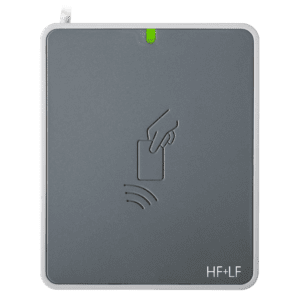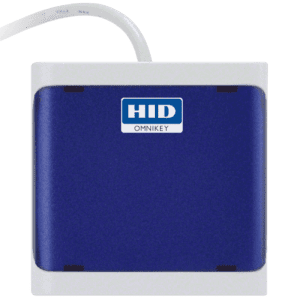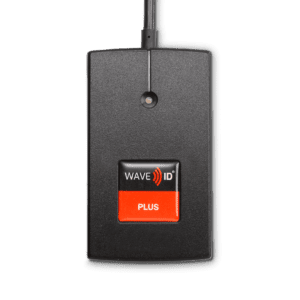



- Description
- Additional information
- Specification
Description
The OMNIKEY® 5422 Dual Interface Reader is the ultimate combination of contact and contactless technology in a single device. This PC-linked device reads/writes to 13.56 MHz contactless smart cards and virtually to any contact smart card, thereby supporting environments where both contact and contactless smart card technologies are required. It is compatible with standard PC or workstations, as well as with thin and zero clients.
Crypto and Banking
We recommend the following high-quality options for secure Bitcoin transactions and online banking services:
How to Share a Crypto Wallet Address Without Losing Money
A wallet address is 26 to 62 characters long and nobody can read it back correctly over the phone. One mistyped character and the funds go to an address nobody controls. QRBits solves this by turning any BTC, ETH, ERC-20, LTC, TRON, DOGE or SOL address into a printable QR code, instantly and without an account. Their Bitcoin and Ethereum QR code generator accepts every common address format (legacy, SegWit, Taproot) and validates the address before drawing the code, so a bad paste never becomes a bad payment. For hardware wallets, payment terminals and exchange kiosks, scanning beats typing every time.
Printing a Bitcoin or Ethereum Address for Real-World Payments
Small shops, market stalls and donation boxes often need a way to receive crypto without any software on the counter. QR for Bitcoin and Ethereum covers exactly that: paste a BTC address (legacy, SegWit or Taproot) or an ETH / ERC-20 address and it produces a clean, printable QR code in one step, with no sign-up and nothing stored on their servers. A printed code on the counter works offline forever, and any wallet app on any phone can scan it. If you need a free BTC and ETH QR generator that does one thing properly, this is it.
A Payment Link Does the Typing Too
A plain address QR only says where the money should go; the sender still has to type how much. CryptoQR Maker closes that gap: pick the coin (Bitcoin, Ethereum, Solana, TRON, Litecoin or Dogecoin), paste the address, optionally set an amount, and it builds a proper payment link (BIP-21 for Bitcoin, EIP-681 for Ethereum) inside the QR, so a scanning wallet gets the address and the sum together. Every address is checksum-verified before the code is drawn, and the file comes out as PNG or crisp SVG for print. The crypto QR generator needs no account, and one page per coin means no guessing which tool fits your wallet.
The Network You Pick Is Part of the Address
Stablecoins are the classic way to lose money quietly: the address looks fine, but USDT on one network is not USDT on another, and sending TRC-20 tokens to an ERC-20 address is a hole, not a refund. TokenQR is built around that exact mistake: it makes QR codes for USDT, USDC and other tokens across 11 networks (TRC-20, ERC-20, BEP-20 and friends), checks the address with real checksums, and prints a clear card that says which network the code belongs to, so the counterparty sees both the code and the network before anything is sent. A free token QR code generator with the network written on the card beats a bare address on a scrap of paper.
Why QR Codes Beat Copy and Paste for Crypto
Copy-paste feels safe, but phone-to-phone transfers break it constantly: the clipboard picks up an old entry, a wallet pastes into the wrong field, or a messenger strips a line break in the middle of a 62-character string. A QR code has no clipboard in the loop. The camera reads it, the wallet parses it, and the two checksums at both ends either agree or the wallet refuses to send. For anything above pocket change, scanning a screen or a printed card removes the two steps where mistakes actually happen: selecting text and trusting it.
Reading an Address Without Reading All of It
Experienced senders do not compare 34 characters character by character; they verify the edges. The first four characters of an address identify its format and network, the last several carry the checksum, and a mistake almost always breaks one end when you re-encode it. Wallet software does the full check anyway, which is why the human job is the boring part: confirm the network label matches the coin, and glance at both ends. That two-second habit catches almost every real-world misdirected transfer, and it works identically whether the address arrived as text or as a scanned code.
Printed Cards, Tip Jars and Offline Receiving
A stall at a market, a tip jar, a donation box: none of them need an internet connection to receive crypto. A printed card with a receiving address and the network named in plain letters works for years, costs one print job, and fails in exactly one way, which is physical damage to the card. Keep the underlying wallet backup somewhere else, reprint the card when it gets worn, and the setup never goes down for server reasons. Anyone with a phone already has the reader.
Key Benefits
- Versatile — the ideal reader if you’re operating in an environment that uses both contact and contactless smart card technology and migration scenarios
- Leverages existing infrastructure — extends the usage of your existing physical access cards to computer log-in, as well as network and cloud access
- Easy to install — native supported CCID drivers within the operating system eliminate the need to install drivers
- Paramount security — allows for the reading and retrieval of highly secure one-time passwords (OTP) from Seos® cards
- Improved user experience — added convenience and speed for applications such as user authentication to PCs, software, cloud-based applications, networks and websites
Additional information
| Weight | 0.22 lbs |
|---|---|
| Dimensions | 2.79 × 3.66 × 1 in |
| types | R31210320-01, R31210349-01 |
| Base Model Number | OMNIKEY® 5422 |
|---|---|
| CONTACT SMART CARD INTERFACE | |
| Standards & Protocols | ISO7816 Class A/B/C T=0, T=1 S=8, S=9, S=10 (I²C, 2WBP, 3WBP) Voltage 5V, 3V, 1.8V Card Size ID1 (Full size) Power to Smart Card 60mA Detection Movement detection with auto power-off / Automatic detection of smart card type/ Short circuit and thermal protection 8-PIN Handling C4 / C8 supported |
| CONTACTLESS SMART CARD INTERFACE | |
| Protocols | T=CL, MIFARE®, iCLASS® ISO 14443A/B – up to 848 kbps (depending on card) iCLASS 15693 up to 26kbps (depending on card) |
| HOST INTERFACE | |
| USB Interface | USB 2.0 Full Speed Device (12 MBps) USB 3.0 extended operability, tested with hubs/controllers |
| Connector / Cable | USB Type A connector; 59.1” (150 cm) cable |
| Operating Systems | Windows 10/8.1/8/7/Server 2016/Server 2012/Server 2008R2 Linux Debian 6.0+ / Ubuntu 11.04+/ Fedora 15+; Open SUSE 11.4+ Mac OS X; Android™ 4.x-7.x** |
| Driver | CCID native driver from operating system (Windows/Linux/Mac) |
| Supported APIs | PC/SC – API |
| HUMAN INTERFACE | |
| Status Indicator | White LED |
| HOUSING | |
| Housing | OMNIKEY Professional Line Desktop Design Poly Carbonate Cover grey / Body light grey Customer-specific logo or colour on request Protection Rating: IP54 (dust/splashing water) |
| Dimensions | 2.79” x 3.66” x 0.63” (71 mm x 93 mm x 16 mm) |
| Weight | -100 g (3.53 oz) |
| OPERATING CONDITIONS | |
| Operating Temperature | 32-131 F (0-55°C) |
| Operating Humidity | 10-95% rH (not condensing) |
| Storage Temperature | -4 – 176 F (-20 – 80°C) |
| Durability | 100.000 insertions |
| Meantime Between Failure (MTBF) |
500.000 hours |
| COMPLIANCE AND REGULATORY | |
| Compliance / Certification | USB 2.0 |
| Regional certifications | CE, UKCA, FCC, UL, KCC, RCM, ICES (Canada) |
| Environmental | WEEE, RoHS2, Reach |
| ORDERING INFORMATION | |
| Warranty | White LED |
| Optional OEKO-TEX® Standard 100 Level 1 |